


ขั้นตอนที่ 1 บัญชีผู้ใช้ Gmail แล้ว ให้ไปที่ www.blogger.com เพื่อสร้างบล็อกกันเลยครับ
โดยในการสร้างบล็อกนั้น ก็ให้ใช้ บัญชีผู้ใช้ (user name + password) ของ Gmail

---------------------------------------------------------------------------------------------------------
ขั้นตอนที่ 2 ในขั้นต่อมาให้กรอก email ของ Gmail ชื่อผู้เขียนบล็อก วันเกิด และยอมรับข้อตกลง
แล้ว Click ที่ปุ่มดำเนินการต่อ

------------------------------------------------------------------------------------------------------------------------
ขั้นตอนที่ 3 การตั้งชื่อเว็บบล็อกสามารถใช้ชื่อที่ชอบได้ตามใจ
แต่การกำหนด URL จะต้องไม่ให้ซ้ำกับคนอื่น ๆ ถ้าซ้ำก็ใช้วิธีเปลี่ยนเป็นคำหรือวลีที่ใกล้เคียงไปเรื่อย ๆ
(การตั้งชื่อและ URL ของบล็อกควรมี keyword ที่สัมพันธ์กับเรื่องที่จะเขียนด้วย)

--------------------------------------------------------------------------------------------------------------------
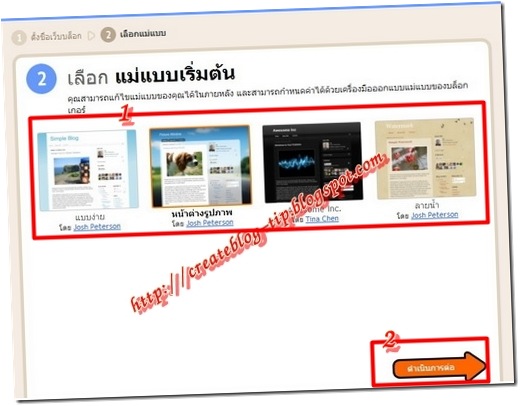
ขั้นที่ 4 ในขั้นสุดท้ายนี้เป็นการเลือกแม่แบบของบล็อก ให้เลือกแม่แบบใดก็ได้ครับ
เมื่อจบ 4 ขั้นตอนข้างต้นถือว่าเสร็จสิ้นขั้นตอนการสร้างบล็อกแล้วครับ (ง่ายดายใช่ไหมครับ)

-------------------------------------------------------------------------------------------------------------------------
ขั้นตอนที่ 5 ในขั้นตอนนี้เป็นการเลือกจัดการกับบล็อกที่สร้างขึ้น
คุณสามารถเข้าไปจัดการส่วนต่าง ๆ ของบล็อกได้จาก www.blogger.com หรือ draft.blogger.com

โดยในการสร้างบล็อกนั้น ก็ให้ใช้ บัญชีผู้ใช้ (user name + password) ของ Gmail

---------------------------------------------------------------------------------------------------------
ขั้นตอนที่ 2 ในขั้นต่อมาให้กรอก email ของ Gmail ชื่อผู้เขียนบล็อก วันเกิด และยอมรับข้อตกลง
แล้ว Click ที่ปุ่มดำเนินการต่อ

------------------------------------------------------------------------------------------------------------------------
ขั้นตอนที่ 3 การตั้งชื่อเว็บบล็อกสามารถใช้ชื่อที่ชอบได้ตามใจ
แต่การกำหนด URL จะต้องไม่ให้ซ้ำกับคนอื่น ๆ ถ้าซ้ำก็ใช้วิธีเปลี่ยนเป็นคำหรือวลีที่ใกล้เคียงไปเรื่อย ๆ
(การตั้งชื่อและ URL ของบล็อกควรมี keyword ที่สัมพันธ์กับเรื่องที่จะเขียนด้วย)

--------------------------------------------------------------------------------------------------------------------
ขั้นที่ 4 ในขั้นสุดท้ายนี้เป็นการเลือกแม่แบบของบล็อก ให้เลือกแม่แบบใดก็ได้ครับ

เมื่อจบ 4 ขั้นตอนข้างต้นถือว่าเสร็จสิ้นขั้นตอนการสร้างบล็อกแล้วครับ (ง่ายดายใช่ไหมครับ)

-------------------------------------------------------------------------------------------------------------------------
ขั้นตอนที่ 5 ในขั้นตอนนี้เป็นการเลือกจัดการกับบล็อกที่สร้างขึ้น
คุณสามารถเข้าไปจัดการส่วนต่าง ๆ ของบล็อกได้จาก www.blogger.com หรือ draft.blogger.com


